
Gazelle Communication Tool
Purpose
Here is a guide to help you to install Gazelle Communication Tool( Rocket Chat ).
Minimal Requirements
- Debian squeeze or ubuntu 12.04 64bits or higher with an Internet access.
- Database : Postgresql 9.1+
- Java virtual machine : JDK 1.7
- Application server : JBoss 7.2.0.
- It must be installed in:
/usr/local/jboss7
- It must be installed in:
To install those requirements you can refer to the documentation of installation of JBoss : General Requirements JBOSS 7
Mandatory
- Gazelle-Keycloak
To install Gazelle-Keycloak follow the link below : [Keycloak] (https://gitlab.inria.fr/gazelle/documentation/gazelle-user-documentation/-/blob/master/Gazelle-Keycloak/installation.md)
Quick start
To install the Gateway module, you have to: clone this repository :
git clone https://gitlab.inria.fr/gazelle/applications/core/communication-tool-gateway.git
and launch this :
Wildfly Local start
mvn clean install
cd communication-tool-gateway-war
mvn org.wildfly.plugins:wildfly-maven-plugin:run
or this :
Quarkus Local start
mvn clean install
cd communication-tool-gateway-quarkus
mvn quarkus:dev
gateway address will be : http://localhost:8080
Gazelle TM configuration
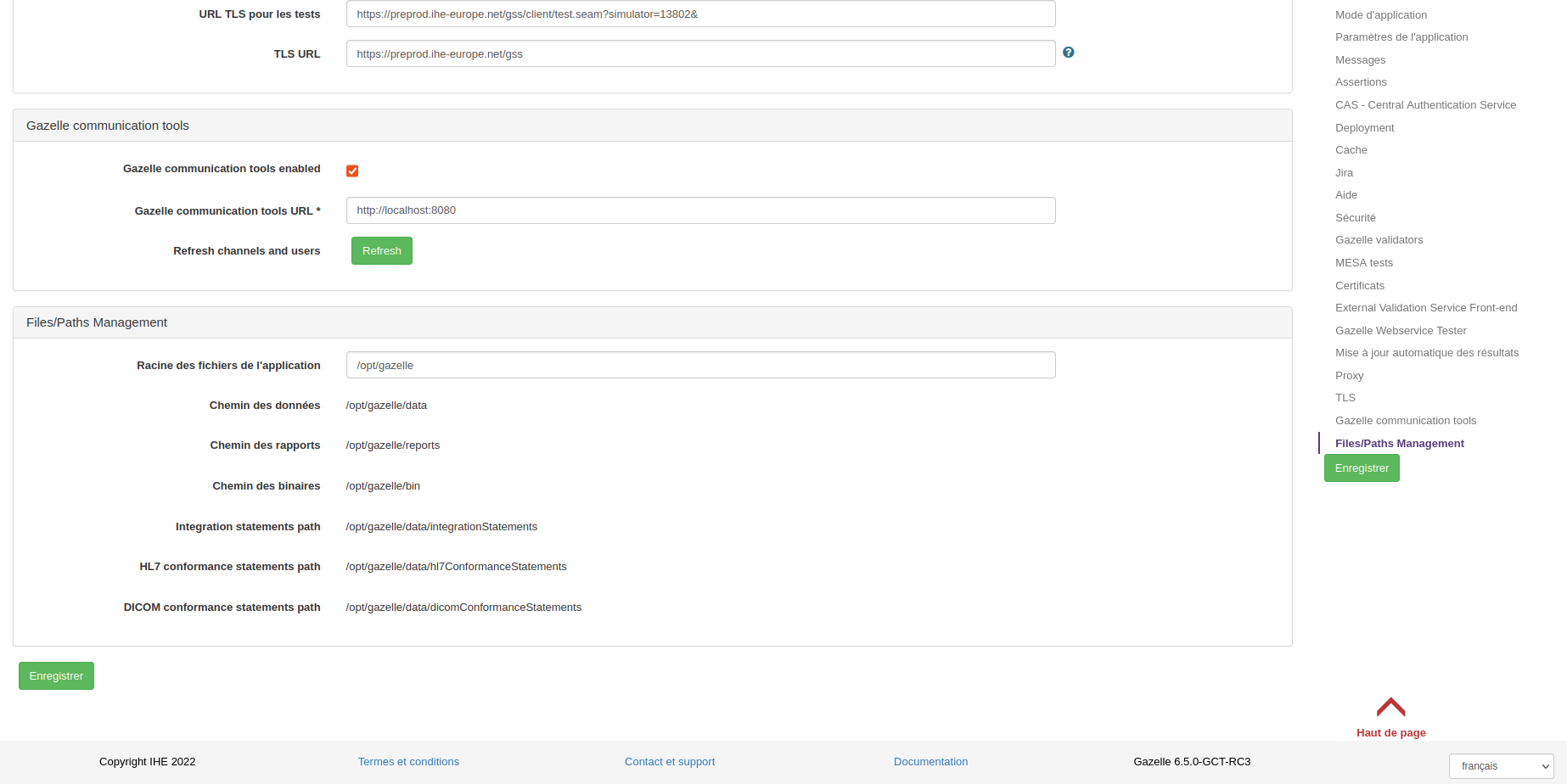
- Gazelle communication tools enabled : enabled
- Gazelle communication tools URL : http://localhost:8080
- Refresh channels and users : click
- save
now users and organizations can be imported to the communication tool (e.g. Rocket Chat)
Deployment
To deploy Gazelle-GCT-RC:
- cp gazelle-tm-ear/target/gazelle-tm.ear /usr/local/jboss7/standalone/deployments
- Display JBoss server logs, start JBoss and wait for ear deployment. tail -f /var/log/jboss7/standalone.log -n 1000
- The application can be browsed at http://localhost:8180/gazelle. Port could also be different whether you have modified the JBoss configuration. For more information about how to manage that externalization, please refer to general considerations for JBoss7.
Insert configuration values
Configuration can be done through the Administration interface or with an sql script.
Each time a configuration is modified, the application needs to be restarted.
To restart the application, there are 2 options:
- Restart jboss: sudo service jboss restart
- Touch the ear: touch /usr/local/jboss7/standalone/deployments/gazelle-tm.ear
Here is the list of configuration variables that must be defined:
| Variable | Default value | Description |
|---|---|---|
| Gazelle communication tools enabled | true | |
| application_url | http://server_domain:8180/gazelle | URL to reach the tool |
| Gazelle communication tools URL | http://server_domain:8080/gazelle | URL to reach the communication tool |
| upload_max_size | 100000000 | Used to limit uploaded files size |
| assertion_manager_rest_url | https://server_domain:8180/gazelle/rest | update server_domain:8080 to fit your needs. |
| security-policies | true | Enable security features |
| Cache-Control | private, no-cache, no-store, must-revalidate, max-age=0 | https://developer.mozilla.org/en-US/docs/Web/HTTP/Headers#Cache-control |
| Strict-Transport-Security | max-age=31536000 ; includeSubDomains | https://developer.mozilla.org/en-US/docs/Web/HTTP/Headers#Cache-control |
| X-Content-Security-Policy | https://developer.mozilla.org/en-US/docs/Web/HTTP/Headers#Cache-control | |
| X-Content-Security-Policy-Report-Only | default-src self *.ihe-europe.net; script-src self unsafe-eval unsafe-inline ; style-src self unsafe-inline ; | https://developer.mozilla.org/en-US/docs/Web/Security/CSP/Using_Content_Security_Policy |
| gazelle_test-management-url | https://server_domain:8180/gazelle/rest/ | points to gazelle test management rest interface |
| application_documentation | https://gazelle.ihe.net/content/gazelle | |
| documentation_url | https://gazelle.ihe.net/content/gazelle |
SSO Configuration
There are additional preferences to configure the SSO authentication.
| Preference name | Description | Example of value |
|---|---|---|
| cas_enabled | Enable or disable the CAS authentication. | true |
| ip_login | Enable authentication by IP address matching ip_login_admin regex. |
false |
| ip_login_admin | Regex to authorize ip authentication if CAS authentication is disabled. | .* |
For more documentation about SSO configurations, follow the link here.
Database configuration
To insert values with an sql script, connect to the database :
su postgres
psql
postgres=\# CREATE USER gazelle;
postgres=\# ALTER USER gazelle WITH ENCRYPTED PASSWORD 'gazelle';
postgres=\# \q
exit
update usr_users set password = MD5('gazelle')    #only en local mode , for change all password database to "gazelle"
INSERT INTO cmn_application_preference (id, class_name, description, preference_name, preference_value) VALUES (nextval('cmn_application_preference_id_seq'), 'java.lang.String', 'CGU URL', 'link_to_cgu', 'cgu link that need to be changed');
INSERT INTO cmn_application_preference (id, class_name, description, preference_name, preference_value) VALUES (nextval('cmn_application_preference_id_seq'), 'java.lang.String', '', 'default_gazelle_language', 'EN');
INSERT INTO cmn_application_preference (id, class_name, description, preference_name, preference_value) VALUES (nextval('cmn_application_preference_id_seq'), 'java.lang.String', '', 'test_session_specification_url', 'https://www.ihe.net/resources/technical_frameworks/');
update tm_testing_session set continuous_session = false;
Compile
Datasource name : TestManagementDS Database name : gazelle
Before compiling, go into gazelle-tm’s directory and edit the file pom.xml. Open this file and adapt the properties of prod profile to your needs :
- jdbc.connection.url :jdbc:postgresql://server_domain:5432/gazelle
- jdbc.connection.user : jdbc.connection.password : credentials for database access