
CDA Generator
CDAGenerator - Installation & Configuration
Here is a guide to help you installing CDAGenerator.
Requirements
- Debian squeeze or ubuntu 12.04 64bits or higher with an Internet access.
- Database : PostGresql 9.1+
- Java virtual machine : JDK 1.7
- Application server : Jboss 7.2.0. It must be installed in:
/usr/local/jboss7
To install those requirements you can refer to the documentation of installation of jboss : General Requirements JBOSS 7
Quick start
- CDAGenerator can be installed using gazelle user on your server:
- Checkout the sources of CDAGenerator : git clone https://gitlab.inria.fr/gazelle/public/validation/cda-generator.git CDAGenerator
- Execute on the root of the project :
mvn clean install - Create a database : cda-generator, in postgresql (createdb -U gazelle -EUTF8 cda-generator)
- Copy the ear from CDAGenerator-ear/target/CDAGenerator.ear to /usr/local/jboss7/standalone/deployment/
- Start your JBoss server and access to http://localhost:port/CDAGenerator
Folder Creation
By default the CDA generator is using the folder /opt/CDAGenerator in order to store files and to access XSD and XSL files. The tar file to be installed is located here.
wget --no-check https://gazelle.ihe.net/files/cda-generator-init-files.tgz
mkdir /opt/CDAGenerator
cd /opt/CDAGenerator
tar zxvf cda-generator-init-files.tgz
Database creation and initialization
The names of the databases are defined in the pom.xml file. Use the following commands :
su postgresql
psql
postgres=\# CREATE USER gazelle;
postgres=\# ALTER USER gazelle WITH ENCRYPTED PASSWORD 'password';
postgres=\# CREATE DATABASE "cda-generator" OWNER gazelle ENCODING UTF-8;
postgres=\# \\q
exit
Insert configuration values
To insert values you can connect to the database
psql -U gazelle cda-generator
Then copy paste the following script:
-- PostgreSQL database dump
--

SET statement\_timeout = 0;

SET client\_encoding = 'UTF8';

SET standard\_conforming\_strings = on;

SET check\_function\_bodies = false;

SET client\_min\_messages = warning;

SET search\_path = public, pg\_catalog;

--

-- Data for Name: cmn\_application\_preference; Type: TABLE DATA; Schema: public; Owner: gazelle

--

INSERT INTO cmn\_application\_preference VALUES (1, 'java.lang.Boolean', '', 'application\_database\_initialization\_flag', 'true');

INSERT INTO cmn\_application\_preference VALUES (2, 'java.lang.String', '', 'application\_name', 'CDAGenerator');

INSERT INTO cmn\_application\_preference VALUES (3, 'java.lang.String', '', 'application\_admin\_name', 'Eric Poiseau');

INSERT INTO cmn\_application\_preference VALUES (4, 'java.lang.String', '', 'application\_admin\_email', 'epoiseau@irisa.fr');

INSERT INTO cmn\_application\_preference VALUES (5, 'java.lang.String', '', 'application\_email\_account\_for\_history', 'epoiseau@irisa.Fr');

INSERT INTO cmn\_application\_preference VALUES (6, 'java.lang.String', '', 'application\_issue\_tracker\_url', 'jira');

INSERT INTO cmn\_application\_preference VALUES (7, 'java.lang.String', '', 'application\_gazelle\_release\_notes\_url', '[*https://gazelle.ihe.net/jira/browse/CDAGEN*](https://gazelle.ihe.net/jira/browse/CDAGEN)\#selectedTab=com.atlassian.jira.plugin.system.project%3Achangelog-panel');

INSERT INTO cmn\_application\_preference VALUES (8, 'java.lang.String', '', 'time\_zone', 'time\_zone');

INSERT INTO cmn\_application\_preference VALUES (9, 'java.lang.String', '', 'application\_zone', 'dd');

INSERT INTO cmn\_application\_preference VALUES (10, 'java.lang.String', '', 'application\_profile', 'prod');

INSERT INTO cmn\_application\_preference VALUES (11, 'java.lang.String', '', 'application\_admin\_name', 'Eric Poiseau');

INSERT INTO cmn\_application\_preference VALUES (12, 'java.lang.String', '', 'dds\_ws\_endpoint', '[*https://gazelle.ihe.net/DDSWS/DemographicDataServerBean?wsdl*](https://gazelle.ihe.net/DDSWS/DemographicDataServerBean?wsdl)');

INSERT INTO cmn\_application\_preference VALUES (14, 'java.lang.String', '', 'schematron\_validator', '[*http://jumbo.irisa.fr:8080/SchematronValidator-SchematronValidator-ejb/GazelleObjectValidatorWS?wsdl*](http://jumbo.irisa.fr:8080/SchematronValidator-SchematronValidator-ejb/GazelleObjectValidatorWS?wsdl)');

INSERT INTO cmn\_application\_preference VALUES (15, 'java.lang.String', '', 'gazelle\_bin', '/opt/gazelle/bin');

INSERT INTO cmn\_application\_preference VALUES (16, 'java.lang.String', '', 'cda\_result\_detail', '[*https://gazelle.ihe.net/EVSClient/xsl/schematronResultStylesheet.xsl*](https://gazelle.ihe.net/EVSClient/xsl/schematronResultStylesheet.xsl)');

INSERT INTO cmn\_application\_preference VALUES (13, 'java.lang.String', '', 'xsl\_path', '[*https://gazelle.ihe.net/xsl/*](https://gazelle.ihe.net/xsl/)');

INSERT INTO cmn\_application\_preference VALUES (17, 'java.lang.String', '', 'sex\_oid', '1.3.6.1.4.1.21367.101.101');

INSERT INTO cmn\_application\_preference VALUES (18, 'java.lang.String', '', 'religion\_oid', '1.3.6.1.4.1.21367.101.122');

INSERT INTO cmn\_application\_preference VALUES (19, 'java.lang.String', '', 'race\_oid', '1.3.6.1.4.1.21367.101.102');

INSERT INTO cmn\_application\_preference VALUES (21, 'java.lang.String', '', 'application\_url', '[*https://gazelle.ihe.net/CDAGenerator*](https://gazelle.ihe.net/CDAGenerator)');

INSERT INTO cmn\_application\_preference VALUES (25, 'java.lang.String', '', 'evs\_url', '[*https://gazelle.ihe.net/EVSClient*](https://gazelle.ihe.net/EVSClient)');

INSERT INTO cmn\_application\_preference VALUES (23, 'java.lang.String', '', 'cda\_xsd', '/opt/CDAGenerator/xsd/ihe\_lab/infrastructure/cda/LabCDA.xsd');

INSERT INTO cmn\_application\_preference VALUES (24, 'java.lang.String', '', 'cdaepsos\_xsd', '/opt/CDAGenerator/xsd/cda\_epsos/CDA\_extended.xsd');

INSERT INTO cmn\_application\_preference VALUES (26, 'java.lang.String', '', 'doc\_path', '/opt/CDAGenerator/doc/');

INSERT INTO cmn\_application\_preference VALUES (22, 'java.lang.String', '', 'svs\_repository\_url', '[*https://gazelle.ihe.net*](https://gazelle.ihe.net)');

INSERT INTO cmn\_application\_preference VALUES (27, 'java.lang.String ', '', 'app\_documentation', '[*https://gazelle.ihe.net*](https://gazelle.ihe.net)');

INSERT INTO cmn\_application\_preference VALUES (31, 'java.lang.String', '', 'cdapharm\_xsd', '/opt/CDAGenerator/xsd/xsd-pharm-tiani/extendedschemas/CDA\_extended\_pharmacy.xsd');

INSERT INTO cmn\_application\_preference VALUES (35, 'java.lang.Boolean', 'Enable or Disable http security headers', 'security-policies', 'false');

INSERT INTO cmn\_application\_preference VALUES (36, 'java.lang.String', 'Sites can use this to avoid clickjacking attacks, by ensuring that their content is not embedded into other sites', 'X-Frame-Options', 'SAMEORIGIN');

INSERT INTO cmn\_application\_preference VALUES (34, 'java.lang.String', '', 'svs\_endpoint', '[*https://gazelle.ihe.net/SVSSimulator/rest/RetrieveValueSetForSimulator*](https://gazelle.ihe.net/SVSSimulator/rest/RetrieveValueSetForSimulator)');

INSERT INTO cmn\_application\_preference VALUES (37, 'java.lang.String', 'Application should return caching directives instructing browsers not to store local copies of any sensitive data.', 'Cache-Control', 'private, no-cache, no-store, must-revalidate, max-age=0');

INSERT INTO cmn\_application\_preference VALUES (38, 'java.lang.String', 'is a security feature that lets a web site tell browsers that it should only be communicated with using HTTPS, instead of using HTTP', 'Strict-Transport-Security', 'max-age=31536000 ; includeSubDomains');

INSERT INTO cmn\_application\_preference VALUES (39, 'java.lang.String', ' is an added layer of security that helps to detect and mitigate certain types of attacks, including Cross Site Scripting (XSS) and data injection attacks', 'X-Content-Security-Policy', '');

INSERT INTO cmn\_application\_preference VALUES (40, 'java.lang.String', 'Chrome flag, uses X-Content-Security-Policy values', 'X-WebKit-CSP', 'Use X-Content-Security-Policy values');

INSERT INTO cmn\_application\_preference VALUES (41, 'java.lang.String', 'Chrome flag, uses X-Content-Security-Policy-Report-Only values', 'X-WebKit-CSP-Report-Only', 'Use X-Content-Security-Policy-Report-Only values');

INSERT INTO cmn\_application\_preference VALUES (42, 'java.lang.String', 'Configuring Content Security Policy involves deciding what policies you want to enforce, and then configuring them and using X-Content-Security-Policy to establish your policy.', 'X-Content-Security-Policy-Report-Only', 'default-src ''self'' \*.ihe.net www.epsos.eu; script-src ''self'' ''unsafe-eval'' ''unsafe-inline''; style-src ''self'' ''unsafe-inline'';');

INSERT INTO cmn\_application\_preference VALUES (43, 'java.lang.Boolean', 'Enable or Disable Sql Injection filter', 'sql\_injection\_filter\_switch', 'false');

INSERT INTO cmn\_application\_preference VALUES (44, 'java.lang.String', '', 'assertion\_manager\_url', '[*https://gazelle.ihe.net/AssertionManager*](https://gazelle.ihe.net/AssertionManager)');


INSERT INTO cmn\_application\_preference VALUES (45, 'java.lang.String', '', 'svs\_simulator\_restful\_url', '[*https://gazelle.ihe.net/SVSSimulator/rest/RetrieveValueSetForSimulator*](https://gazelle.ihe.net/SVSSimulator/rest/RetrieveValueSetForSimulator)');

INSERT INTO cmn\_application\_preference VALUES (29, 'java.lang.String', '', 'ip\_login\_admin', '.\*');

INSERT INTO cmn\_application\_preference VALUES (28, 'java.lang.Boolean', '', 'ip\_login', 'f');

INSERT INTO cmn\_application\_preference VALUES (48, 'java.lang.Boolean', '', 'cas\_enabled', 'true');

INSERT INTO cmn\_application\_preference VALUES (47, 'java.lang.String', ' ', 'bbr_folder', '/opt/CDAGenerator/BBR/');

INSERT INTO cmn\_application\_preference VALUES (48, 'scorecard_root_oid', 'An OID with trailing DOT (.)', 'java.lang.String', 'The root OID for identifying scorecards');

INSERT INTO cmn\_application\_preference VALUES (49, 'scorecard_next_index', '1', 'java.lang.Integer', 'The next index to be used for identifying scorecards');
| variable | Description | type | default |
|---|---|---|---|
| app_documentation | link to documentation of the tool | java.lang.String | https://gazelle.ihe.net/content/cda-model-based-validation |
| application_admin_email | email of the admin | java.lang.String | epoiseau@irisa.fr |
| application_admin_name | name of the admin | java.lang.String | Eric Poiseau |
| application_database_initialization_flag | inserted by the application | java.lang.Boolean | true |
| application_email_account_for_history | email of the admin | java.lang.String | eric.poiseau@inria.fr |
| application_gazelle_release_notes_url | release notes’ url | java.lang.String | https://gazelle.ihe.net/jira/browse/CDAGEN#selectedTab=com.atlassian.jira.plugin.system.project%3Achangelog-panel |
| application_issue_tracker_url | issue tracker url | java.lang.String | jira |
| application_name | application’s name | java.lang.String | CDAGenerator |
| application_profile | application’s profile (always prod) | java.lang.String | prod |
| application_url | application’s URL | java.lang.String | https://gazelle.ihe.net/CDAGenerator |
| application_zone | application zone | java.lang.String | GMT+1 |
| assertion_manager_url | link to assertion manager | java.lang.String | https://gazelle.ihe.net/AssertionManagerGui |
| Cache-Control | Application should return caching directives instructing browsers not to store local copies of any sensitive data. | java.lang.String | private, no-cache, no-store, must-revalidate, max-age=0 |
| cda_result_detail | link to cda stylesheet result | java.lang.String | https://gazelle.ihe.net/EVSClient/xsl/schematronResultStylesheet.xsl |
| cda_xsd | path to schema | java.lang.String | /opt/CDAGenerator/xsd/ihe_lab/infrastructure/cda/LabCDA.xsd |
SSO Configuration
There are additional preferences to configure the SSO authentication.
| Preference name | Description | Example of value |
|---|---|---|
| cas_enabled | Enable or disable the CAS authentication. | true |
| ip_login | Enable authentication by IP address matching ip_login_admin regex. |
false |
| ip_login_admin | Regex to authorize ip authentication if CAS authentication is disabled. | .* |
For more documentation about SSO configurations, follow the link here.
Compile
Before compiling, go to the CDAGenerator’s project directory and edit the file pom.xml. Open this file and adapt the properties of profile ‘prod’ to your case :
-
jdbc.connection.url : jdbc:postgresql:cda-generator
-
jdbc.connection.user / jdbc.connection.password : credentials for database access
Then, create the EAR archive with the command line:
cd CDAGenerator
mvn clean package
The archive (EAR) and the distribution file are created and placed into CDAGenerator/CDAGenerator-ear/target directory.
Deployment
Copy the CDAGenerator.ear into the “standalone/deployments” directory of your JBoss 7.2 server. Finally, start your server.
When the application is deployed, open a browser and go to http://yourserver/CDAGenerator.
If the deployment and the database initializations are successful, you should see the home page of the tool.
Configuration of the documentation of MBV
The administrator is able to configure the documentation of the validation constraints and rules
First, the user shall be logged in as an administrator.
Then, go to Administration > Constraints Management > Constraints-admin
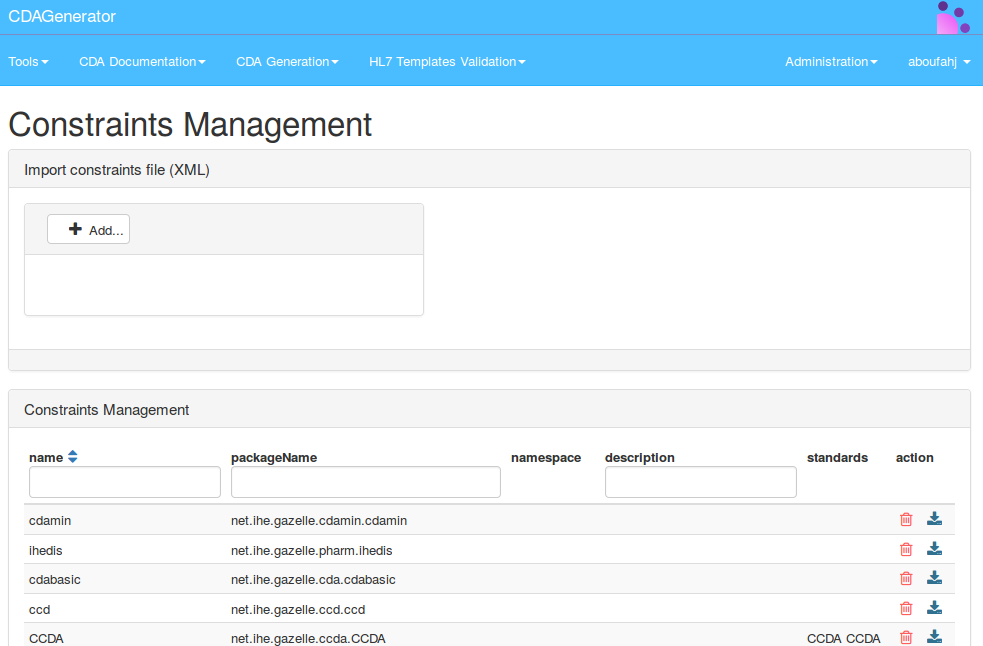
The user shall then upload the XML file generated from the model of constraints into the tool using the button “Add” (see screenshot above).
After the upload process is complete, click on the button “Delete and Generate”. This button will delete all the constraints related to packages that are mentioned in the uploaded XML file. If there are some constraints related to other packages, there will not be deleted. All the informations of the XML document are inserted in the database of the tool.
CDA Generator – Configuration of BBR
This part is dedicated to administrators of CDAGenerator.
To access the BBR configuration pag,e you need to go to the menu Administration > Building Block Repository
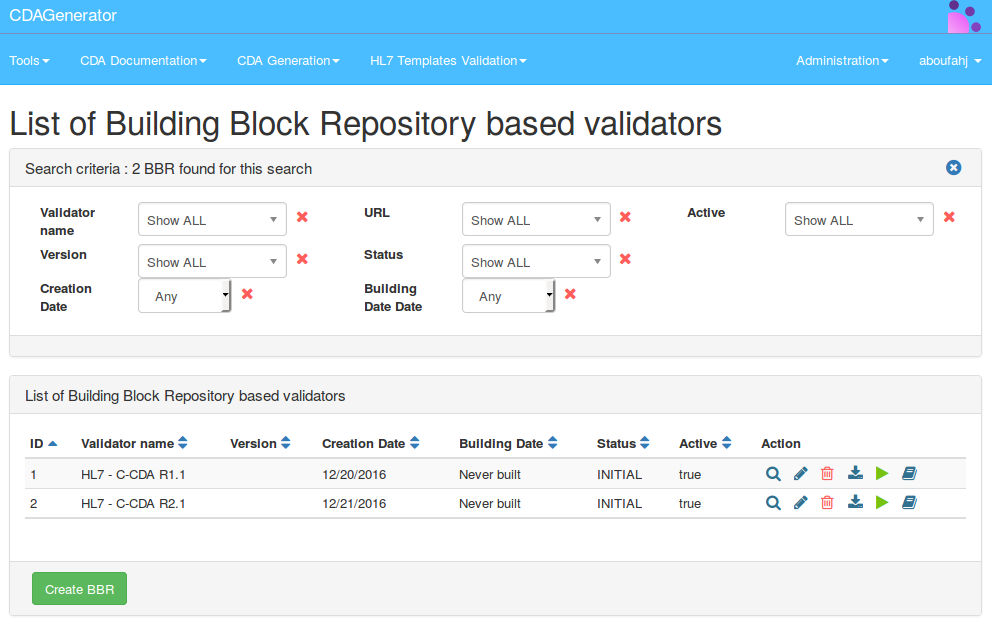
A BBR is the export coming from ART-DECOR in HL7 Templates format. This tool allows to generate validators based on this export and using Gazelle ObjectsChecker technology. You can find in the paragraph references, some references to the documentation of both Gazelle ObjectsChecker and ART-DECOR.
The main idea regarding the definition of the BBRs in CDA is to compile them and to deploy them. You are able to create a new BBR using the button “Create BBR” :
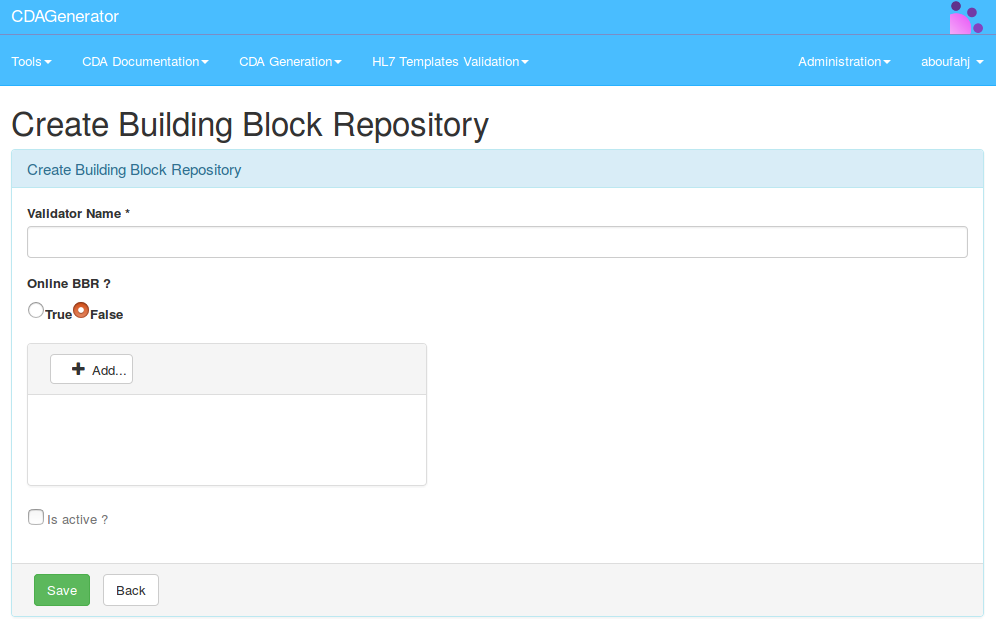
You need to specify the name of your validation tool and the link to the BBR as well. You can provide the xml export as a file and upload it, or you can provide an URL to the BBR.
Example of URL : https://art-decor.ihe-europe.net/decor/services/RetrieveProject?prefix=IHE-EYE-SUM-&version=&mode=verbatim&language=en-US&download=true&format=xml
The checkbox “Is Active?” is used to expose the BBR for the validation or not.
In the table, we have six buttons in the “Actions” column :
- View: Allows to view the information related to the BBR
- Edit: Redirects to the edition page of the BBR
- Delete: Deletes the BBR from the database, it does not delete the validator from the server
- Download: Allows to download the BBR, not the validator
- Compile: Allows to compile the BBR and to create the validator
- Deploy documentation: Allows to deploy the documentation in CDAGenerator. The documentation will be located in Constraint Documentation
We can filter BBRs using the filter part of the page :
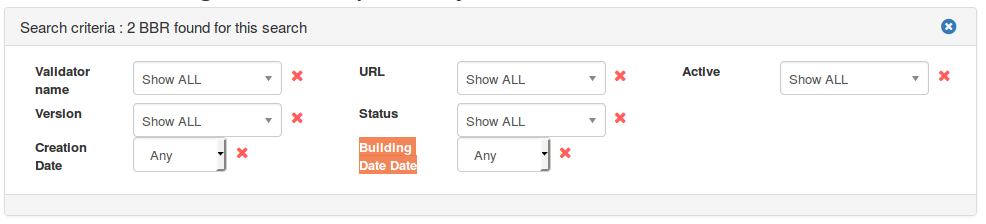
The parameters used in filters are :
- Validator name
- Version : version of the validator
- Creation date (of the validator)
- URL : if the BBR is based on a URL, you can filter by it
- Status : the status of the BBR (initial, deployed, etc)
- Building Date
- Active (or not)
When a BBR is added, its name is used in the validation service in EVSClient (if it is active). The filtering of the BBR in EVSClient is based on the same principle of filtering as the other validators, if the name of the BBR contains a word coming from the referenced standard in EVSClient, it is proposed as a validator by CDAGenerator
Here is the process in the background for a user, how CDAGenerator works :
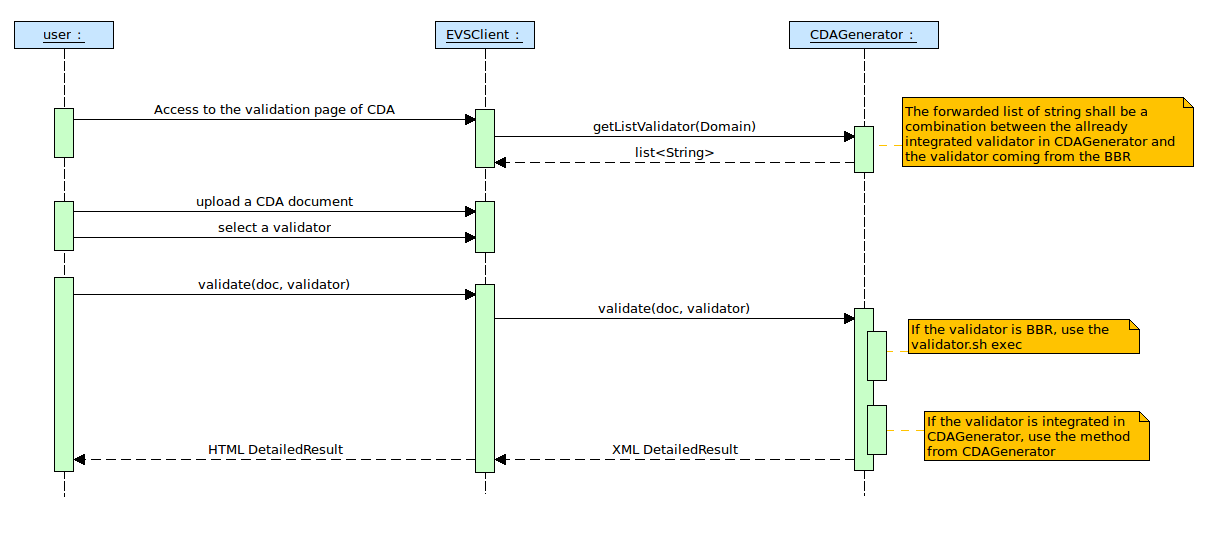
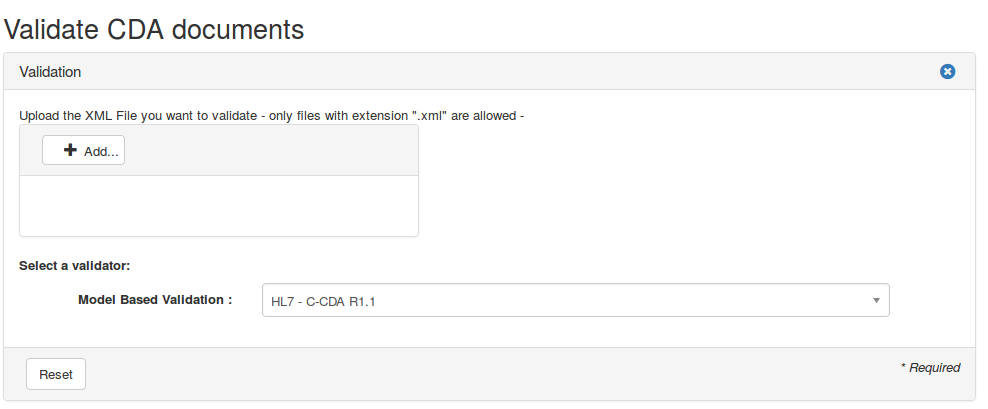
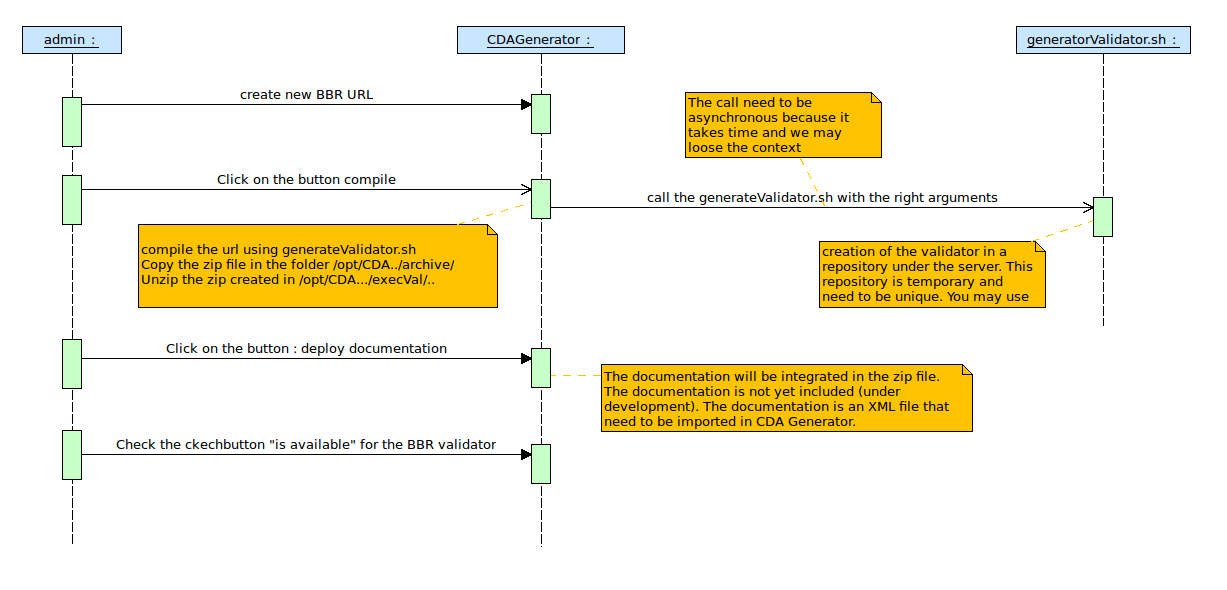
The workflow for the Administrator is described by this sequence diagram :
Validators on the server
When you click on the button “Validate” the application executes on the server the generation of the validation tool based on the BBR uploaded in the tool. The default folder used in this case is /opt/CDAGenerator/BBR. You can customize this location by changing the preference of the application named “bbr_folder”. The architecture of this folder is described below:
BBR
├── generatedValidators
│ ├── archives
│ │ ├── 1
│ │ │ ├── iheeyegeecn-validator-app-0.0.1-SNAPSHOT-1.zip
│ │ ├── 2
│ │ └── ccdaadr11-validator-app-2.zip
│ ├── execs
│ ├── 1
│ ├── bin
│ │ ├── resources
│ │ ├── validator.bat
│ │ └── validator.sh
│ ├── documentation
│ │ └── iheeyegeecn-constraint.xml
│ └── repo
├── generator
│ ├── hl7templates-packager-app
│ ├── generateValidator.sh
│ ├── packager
│ │ ├── bin
│ │ │ ├── generator.bat
│ │ │ └── generator.sh
│ │ └── repo
│ │ ├── list jars
│ └── version.txt
- generatedValidators folder contains the list of generated validation tools. It contains two sub folder: execs and archive.
- The execs folder contains the current executable used for the validation.
- The archive folder contains the list of zip generated through the tool. When you click on the “compile” button from the BBR manager page, you create a zip file archived in archive folder, and unzipped in exec folder.
- The folder generator contains the generator used to generate the validators based on the BBR URL. This generator can be used outside the CDAGenerator tool. In the same way, the generated validators can be used outside the CDAGenerator tool, as a standalone validation tool. The generated validators contains three main folders : bin, repo and documentation.
- bin folder contains an executable : validator.sh and validator.bat. This executable is used by CDAGenerator during the validation of CDA documents.
- repo folder contains a list of jars used by the validator.sh.
- documentation folder contains a the documentation that needs to be deployed in CDAGenerator, in XML format.
References
- Gazelle ObjectsChecker:
- paper on IHIC2015: http://www.ejbi.org/img/ejbi/2015/2/Boufahja_en.pdf
- paper on HEALTHINF 2014 : http://gazelle.ihe.net/files/HEALTHINF_2014_49_CR_2.pdf
- presentation on IHIC 2015 : http://gazelle.ihe.net/files/paper_ihic_presentation_0.pdf
- documentation of gazelle EVSClient: http://gazelle.ihe.net/content/cda-model-based-validation
- Blog in Ringholm (René Spronk): http://www.ringholm.com/column/HL7_CDA_Conformance_testing_tools_analysis.htm
- Eric Poiseau presentation in HL7 WGM of Paris, May 2015 : https://vimeo.com/127800129
- EVSClient : http://gazelle.ihe.net/EVSClient/
- Art-decor:
- Art-decor website : http://art-decor.org/
- Art-decor tutorials : http://art-decor.org/mediawiki/index.php/Documentation
- Art-decor papers and presentations : http://art-decor.org/mediawiki/index.php/Download
CDA Generator – Configuration of ValidatorDescriber
The validators describer is a link between the documentation and the validators. This allows us to have an architecture of the validators.
To access this page you need to go to menu Administration > Validators Packages :
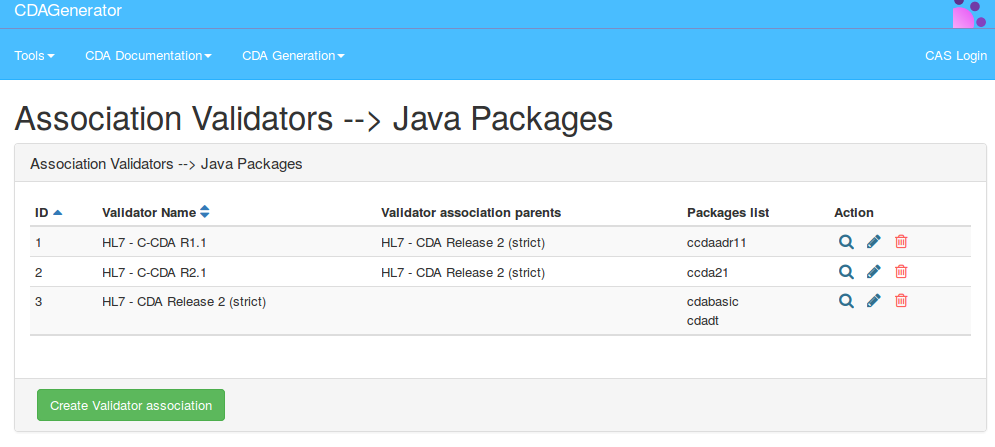
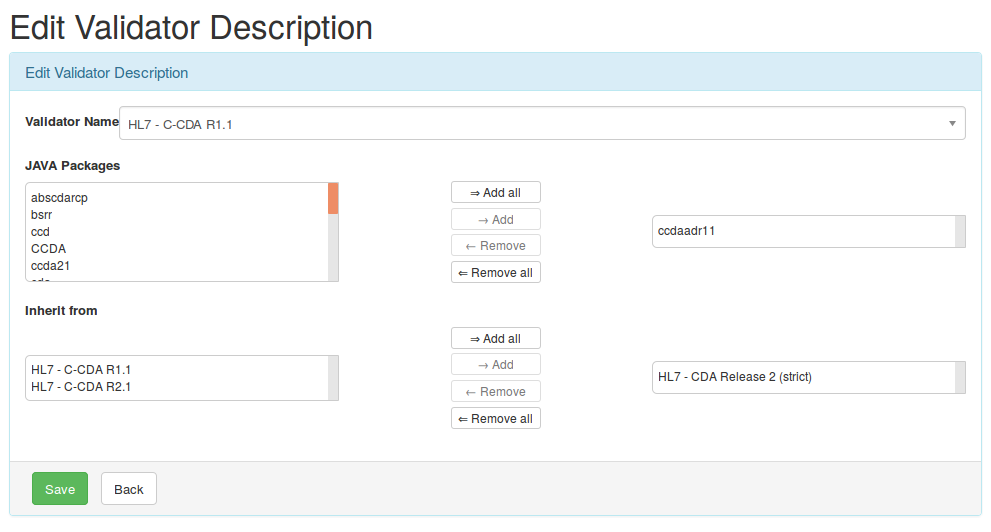
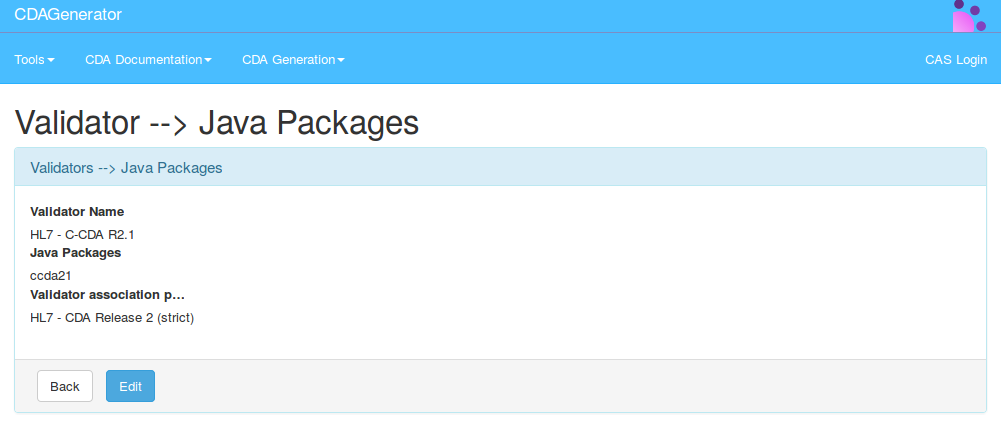
This page is for the administrators of the tool. It represents an association between validators and packages of documentation. For each association we have an id, the validator name, the list of the validator’s parents and the list of packages directly related to the validator. The complete list of packages related to a validator is the concatenation of the direct related packages, and the sum of all the packages list related to the parents, grand-parents (and so) of the validator. You can create a new validator association by clicking on the button “Create Validator association”.
The “Action” column contains three buttons : view, edit and delete. The edit page looks like this :
The view page for the ValidatorDescriber looks like this :
The validatorDescriber is used by CDAGenerator for the scoring of the validation results.